Error Like You Mean It: Designing Better Error Handling in Mendix Applications


When planning an application, what a user sees when things go wrong should be part of your design. You can’t anticipate every scenario, but a meaningful error message can inform your users what action to take and give your support team valuable clues about the root cause. Ignore this vital part of the design, and you risk turning a simple error into hours of troubleshooting, debugging, guesswork and email chains.
What do you expect a system to do when it errors?
Think about other systems you interact with and how they communicate faults.
A car is a good example. When something unexpected happens, a warning light appears on the dashboard, sometimes accompanied by an audible alert to get the driver's attention. The type of warning indicates the level of attention required; from something that needs immediate action to a minor issue that can be addressed later.
The driver doesn’t necessarily need to know exactly what has gone wrong under the bonnet. They need to understand what’s happening, whether they need to act, and what they should do next. The same principle applies when designing an application. When something goes wrong, we need to consider how the issue is communicated, how serious it is and what the user should do next.
What visual cues can we use to show an error has occurred?
A car doesn't overwhelm the driver with technical detail. Instead, a warning light communicates that something needs attention, with the type of warning indicating the level of urgency. The type of warning helps indicate the severity; from low tyre pressure that can be addressed later, to an engine warning that may require immediate action. The aim is to make the error noticeable without unnecessarily disrupting the user's workflow. Applications can use the same principle. The visual cue should reflect the severity of the issue and, wherever possible, help the user understand what action they need to take next.
Error Page:
An error page takes the user away from their current journey and is best suited to issues that prevent them from accessing or continuing within an area of the application. For example, a 404 error indicates that the requested page cannot be found. Rather than displaying a generic technical message, a branded error page can explain what has happened and give the user clear options, such as returning to the homepage or contacting support.
Consider: Can the user recover from the error themselves? If so, give them a clear route back into the application.
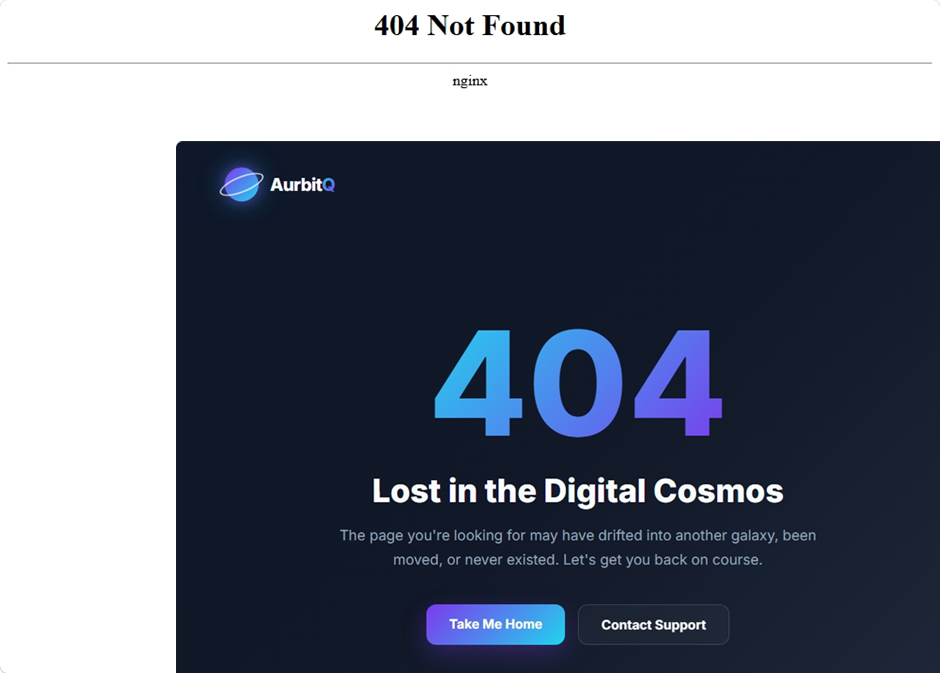
Foreground: Branded404 page not found error with call-to-action buttons to the homepage and contact support.
Pop-up modal:
A modal interrupts the user’s current activity and captures their attention. This makes it appropriate for unexpected issues that prevent the user from continuing with the action they are taking. For example, if an application cannot save a form or complete a transaction, a modal can explain the problem and provide a clear next step.
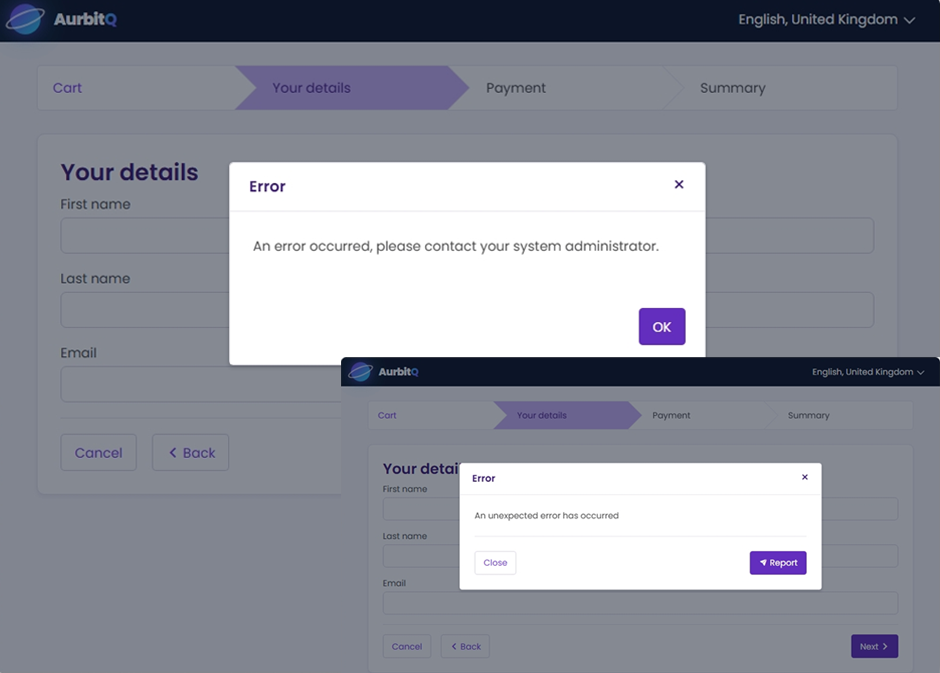
Tip: Mendix’s default generic error message is: “An error occurred, please contact your system administrator.”
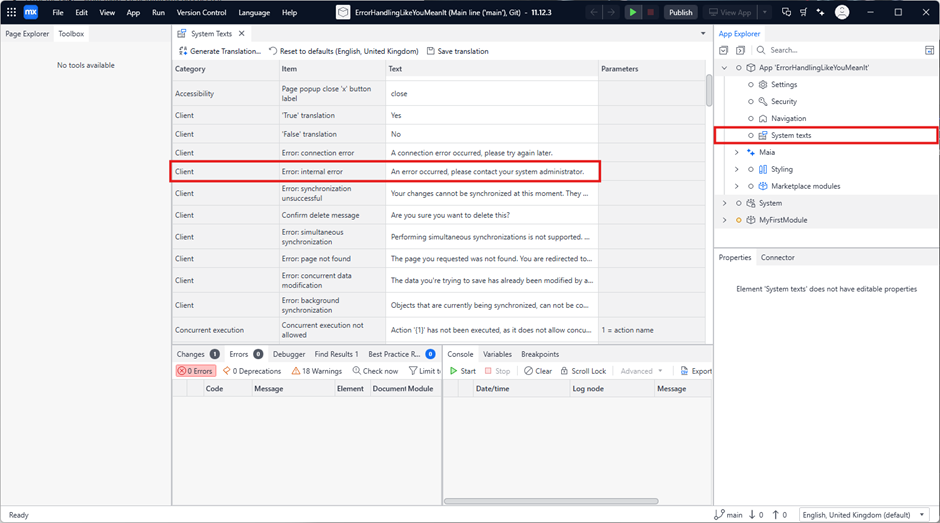
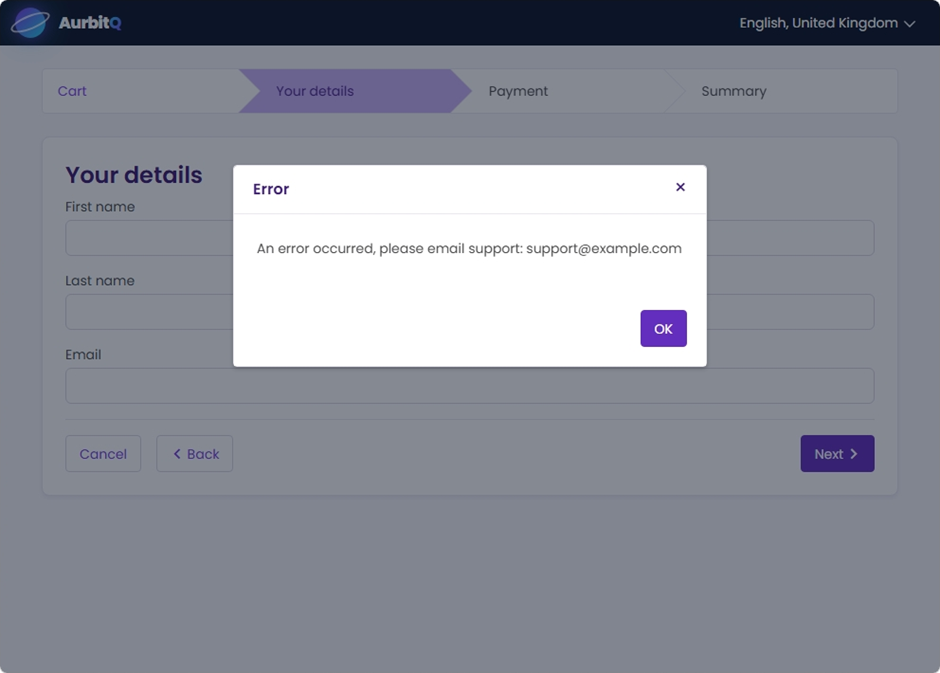
This tells the user very little about what has happened or what they should do next. Consider replacing generic messages with something more meaningful. For example, directing the user to your IT helpdesk or support team. Where appropriate, you can also simplify the reporting process by providing a direct route to contact support.
Toast notification:
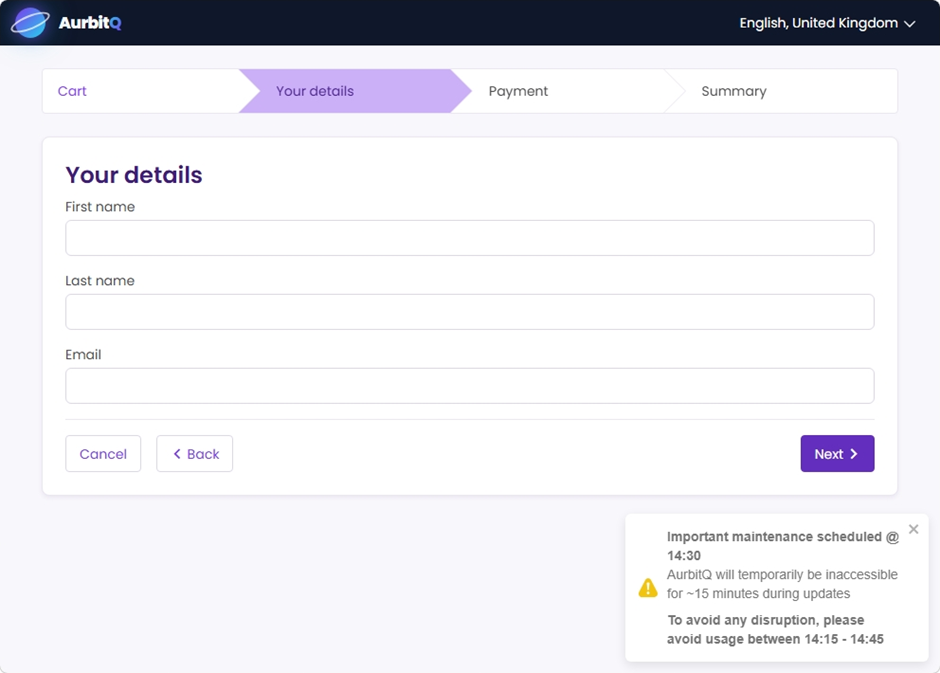
A toast is a subtle, temporary notification that allows the user to remain in their current workflow. It is useful for issues that affect part of a process but do not prevent the user from continuing altogether. For example, a notification could inform a user that a background action has failed, or that a scheduled maintenance window may affect a particular function.
Consider: Does the user need to take action immediately, or is it enough to make them aware of the issue?
Styled card:
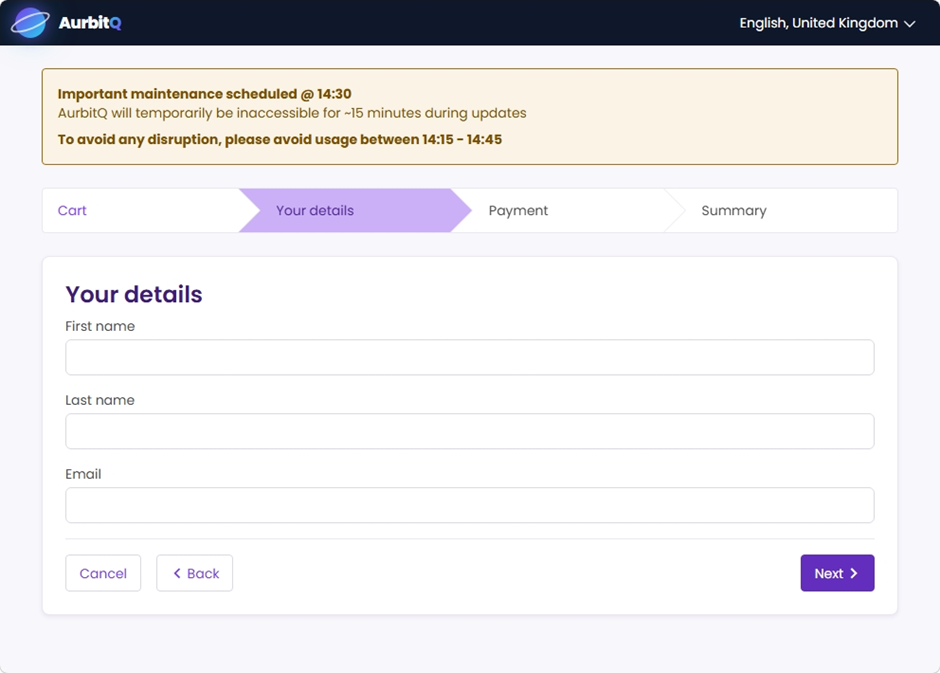
A styled card provides more context than a toast while remaining part of the page. It works well when an issue is relevant to a specific area of the application and the information needs to remain visible. For example, a dashboard could use a card to highlight an operational issue, delayed process or upcoming maintenance that requires attention.
Consider: Does the information need to remain visible while the user continues working?
Indicator icon:
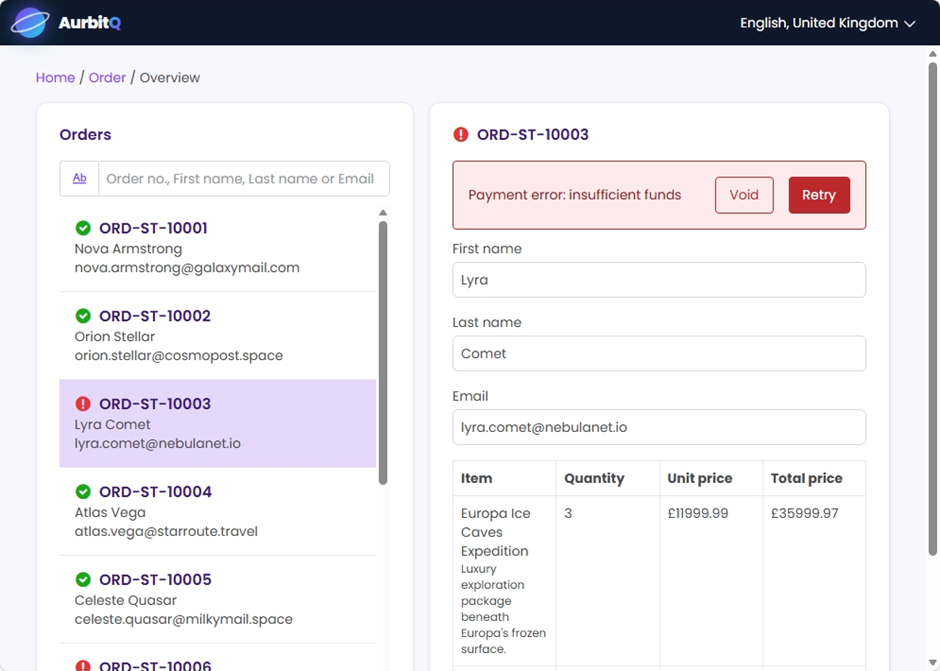
An indicator icon provides a quick visual signal without distracting the user from the main task. It is particularly useful when multiple items or processes need to be monitored at the same time.
The key principle: The right visual cue depends on severity, urgency and the action required from the user. The goal isn’t to expose every technical detail. It is to give the user enough information to understand what has happened, what they need to do next and, where necessary, how to get help.
How can you make it easier for the user to report errors?
When a car develops a fault, a mechanic needs more than simply knowing that something is wrong. They need information about what happened, when it happened and the circumstances surrounding the issue to diagnose the problem.
Your application support team needs the same level of context to investigate and resolve errors efficiently. Giving users a simple way to report an issue, while capturing useful diagnostic information in the background, can significantly reduce the guesswork and back-and-forth involved in troubleshooting.
Give the error a unique ID:
Generate a unique error ID or reference when an error occurs. This can be recorded in the application logs for administrators and displayed to the user alongside the error message. The user can then provide this reference when contacting support, allowing the support team to quickly trace the error back to the relevant log entry.
Make reporting easy
Rather than asking the user to start a new email and explain everything from scratch, provide a “Contact support” or “Report this error” link. This can open a pre-populated email containing useful information such as:
- Error ID
- Username
- Date and time
- The action the user was attempting
- Relevant application or page information
The user can then add a short description of what they were doing and submit the request without having to work out what information support needs.
Build it into a generic error-handling flow
These capabilities can be managed through a generic error-handling flow that can be reused across the application. This means errors are handled consistently, useful diagnostic information is captured automatically, and users always have a clear route to support; reducing troubleshooting time and unnecessary email chains.
Should the system automatically retry?
Think about what happens when you stall a car. Some modern cars can automatically restart the engine when you depress the clutch, while others require you to manually turn the ignition. The right approach depends on what has happened and whether the system can safely recover without user intervention. The same principle can be applied to application business logic. Not every error needs to be presented to the user immediately. If the system can safely recover from a temporary failure, an automatic retry can provide a better experience and prevent unnecessary interruptions.
API integrations could be a good candidate for this, there could be faults presented by other systems that we can automatically retry. Retries should be carefully controlled, with appropriate limits and delays between attempts. This helps prevent repeated requests from placing unnecessary load on external systems or creating duplicate transactions.
What do you expect an admin to see when the system errors?
Sticking with the car as our system example, a mechanic needs more than the warning light on the dashboard. They can connect diagnostic equipment to the car’s computer and access fault codes and other information to understand what has happened and troubleshoot the problem.
The same principle applies to applications. The user may only need a simple message telling them something has gone wrong, but administrators and support teams need much more information to understand the cause and resolve it. When designing error handling, there are a few key questions we can ask ourselves.
Log messaging
Mendix and Java provide standard logging mechanisms that can capture useful information about an error, including:
- Date/time stamp - the exact time the error happened.
- Error type - how the event is classified, makingit easier to identify and prioritise issues.
- Error message - the context of the error. It is important we know why the error occurred.
- Stack trace - where the error occured. This is important to know when additional debugging tools are required to troubleshoot.
By default, uncaught exceptions in Mendix microflows will be recorded in the application logs in a format similar to the following, with token information represented by <…>:2026-08-14T15:40:38.316232[runtime-container/abc123]
ERROR -Connector: An error has occurred while handling the request. [User '<System.User/Name>'with session id '<System.Session/SessionId>' and roles '<System.UserRole/Name>']
<System.Error/ErrorType>: <System.Error/Message>
<System.Error/Stacktrace>
If you are handling your own error logic, you might want to consider...Is there any other context we can add to make the messages more meaningful?
Object state
You could have a 'status' attribute on your entity to track an objects error state. Just like our Indicator icon example above, we can drive UI elements based on this status.
What additional context can we capture?
A fault code gives a mechanic a starting point for diagnosing a problem. Application errors should provide administrators with the equivalent context. Depending on the scenario, this could include:
- Unique identifier of object(s) (ID, Name or GUIDfor example)
- If API call: HTTP request and response content,headers, URL
- User information - by default, uncaughtexceptions in Mendix will log the stack trace. But if you are using your ownerror handling logic, it is good to know who encountered the error, and canpotentially identify if the issue is role based.
- Stack trace - by default, uncaught exceptions in Mendix will log the stack trace. But if you are using your own error handling logic, you will need to make sure this is added in the log message action if itis important.
The important question is not simply “Can we log the error?”, but “What information will someone need to diagnose and resolve it?”
Where should errors be logged?
There are several ways to manage application logs, depending on the needs of the application and support team.
- Standard log file - Mendix provides application logs that can be used to investigate and troubleshoot issues.
- Log management tooling - Platforms such as Datadog and Grafana provide log aggregation, searchingand analysis capabilities, making it easier to investigate and manageapplication logs.
- Internal log management module - A custom module within your Mendix application could providefunctionality to organise, search and review application log messages.
Do admins need additional internal pages/actions to get data unstuck?
Sometimes fixing an error isn't simply a case of identifying what went wrong. An administrator may need to reset an object, change a status or restart a process to allow the application to continue.
For example, there may be scenarios where administrators need to reset objects or update their status. An administrative page could allow authorised users to reset or modify attributes that aren't visible to end users but influence application navigation, display or business logic.
These actions should be designed carefully, with appropriate permissions and auditability, but they can prevent support teams from having to make database-level changes or rely on developers every time something becomes stuck.
The goal: diagnose, resolve and recover - good error handling shouldn't stop at displaying an error. It should give the right information to the right person at each stage.
The user needs to know what happened and what to do next.
The support team needs to know what happened, where and why.
The administrator needs the tools to resolve the issue and get the process moving again.
By considering all three from the outset, you can create applications that are easier to use, easier to support and more resilient when things don't go to plan.
Because errors are inevitable. Spending hours trying to understand them doesn't have to be.
Supporting Resources:
· ErrorHandling in Microflows | Mendix Documentation
· Create Custom Error Pages | MendixDocumentation
More from Knowledge Hub
Continue exploring insights and strategies