AuraQ has vast experience helping organisations find the gaps that can be filled to enhance their business. This could be to improve efficiency, integrate legacy systems or deliver new portals and strategic applications to create competitive advantage. Contact us to request a free, no obligation Gap Analysis.





Keeping Mendix Apps Fast as They Grow
Performance issues in Mendix apps aren’t usually caused by one big mistake, but can be a result of lots of small decisions made over a period of time. As an application evolves and grows in functionality, it naturally takes on more data and more sophisticated logic. Mendix apps start out fast and responsive, with pages loading instantly and logic running smoothly but over time, performance can quietly become an issue.
This is completely normal and the good news is that most performance issues in Mendix applications aren’t caused by the platform itself but by common design and structure choices. They aren’t a result of bad development or platform limitations, but the gradual build-up of design decisions. There are many ways we can improve Mendix application performance and in this blog post, I will be focusing on the areas that consistently make the biggest difference.
Performance problems are usually gradual and a key lesson in performance optimisation is understanding that it progresses incrementally. Performance issues are easy to ignore early on but, if left unchecked, these small delays can add up and start to affect the overall user experience. It has been found that over 50% of users abandon apps that take longer than 3 seconds to load, with each extra second of delay reducing task completion rates by around 7%. This is why it is crucial to keep app optimisation in mind throughout development and on an on-going basis. Speedy apps = happy users!
When we observe this, the best approach is to pause and examine three core aspects: how the app retrieves data, executes its logic, and renders pages.
#1 Data retrieval
As we build apps that handle important data, it is easy to fall into the trap of thinking “it’s safer to retrieve all the data, just in case”. Whilst this isn’t a bad instinct, in practice it often leads to unnecessary data being loaded which can quickly impact performance as our applications grow.
Common mistakes with data retrieval:
- XPath queries are too broad
- Pages load full datasets “just in case”
- Loading related objects through associations when the page or logic doesn’t need it
Improvements:
- Limit the number of objects returned in list and data views
- Review associations and ensure the most appropriate path is being taken, not the most convenient
- Be specific with XPath constraints and avoid retrieving “everything”
Using indexes can be a great way to improve performance. Without an index, the database may need to scan every record in a table to find matching results. By applying an index to attributes which are frequently used in XPath constraints, the database will be able to find the data it needs much more efficiently. It is worth noting that indexes are best used when data is read more than it is written. If data changes frequently, it’s worth focusing on other optimisation methods (Image 1).
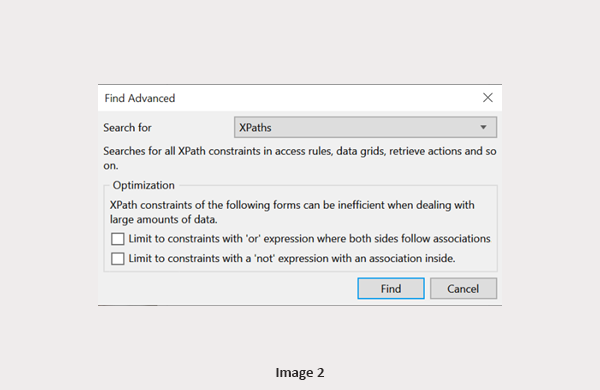
Top tip: Within Mendix Studio Pro, make use of the Find Advanced feature (Ctrl + Shift + F), searching specifically for XPaths. This will allow you to quickly find the large XPaths in your applications and make them more efficient if applicable (Image 2).

Object Query Language: OQL is a SQL-like query language used in Mendix. In many scenarios, it allows you to query data more efficiently than XPath queries. It is best used when dealing with large datasets, as it avoids loading unnecessary data into memory and pushes the query straight to the database.
When to use OQL:
- When you only need read-only data (OQL does not support create, update or delete operations pre v11.6)
- When you have large datasets (thousands to millions of records)
- When using aggregations (SUM, AVG, MIN, MAX) or grouping data (GROUP BY)
- When you need to do complex joins
XPath: Like most of the methods we have already covered, there are pros and cons of using each optimisation method. If the OQL statements do not apply to your data, you may be best sticking with XPath filtering using the best practices mentioned above.
When to use XPath:
- When you need to create, update and delete data via objects and microflows
- When you have small to medium datasets
- When you need Mendix objects in memory for processing further down the line
- When you are dealing with simple associations
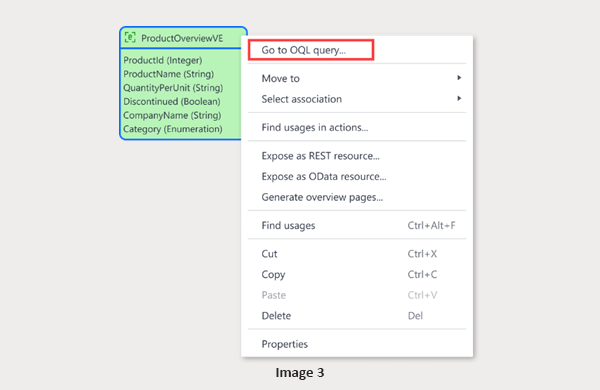
View Entities: Following on from OQL, Mendix also offer the functionality of view entities which can be a great way to help performance. A view entity is a visual, dynamic data set backed by an OQL query and can be used similarly to a persistable entity. View entities offer a read-only alternative that executes queries directly in the database without loading unnecessary data into memory. The data retrieved is always up to date as the query is executed each time the view entity is accessed (Image 3). Upon selecting Go to OQL Query, the OQL editor will open up and give users the ability to write queries with built in validation and suggestions (Image 4).

#2 Microflows and executing logic
Microflows are used consistently throughout Mendix applications and are incredibly useful, however they are also an area where performance issues can creep in. In a recent survey, nearly half of the developers said microflows are their number one performance culprit. As the requirements change in a project, microflows tend to grow and the logic expands. It is worth keeping an eye on preventing the following things to ensure performance does not suffer as a result of your flows:
- Using long nested if-else statements
- Using synchronous microflows where asynchronous would be more appropriate
And never put retrieve and commit actions inside loops. This single handedly can cause major performance issues.
Improvements:
- Break complex logic into smaller, reusable sub-microflows.
- Be mindful of database actions (retrieves, commits) inside loops, especially with large data sets (Image 5).
- Be intentional with choosing between synchronous and asynchronous microflows. Asynchronous logic runs in the background and is best for longer running logic such as bulk processing, significantly reducing page wait times and improving the user experience (Image 6).


Batch processing: Another common performance killer in Mendix applications is trying to do too much in a single request. This situation often occurs when we try to process large datasets, for example, updating thousands of records in one go. Within microflows, Mendix gives us the ability to break down the processing into smaller, more manageable chunks. Each batch is processed independently which allows the application to remain responsive even when dealing with large amounts of data.
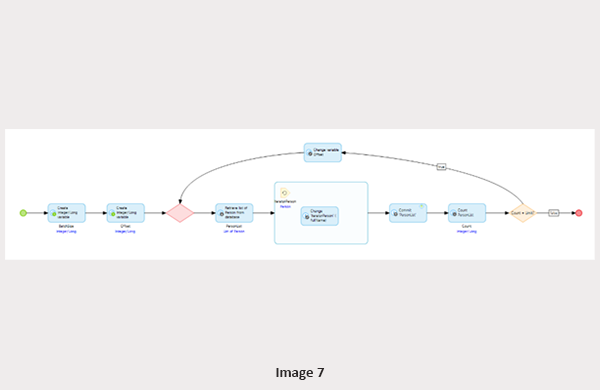
To use batch processing within your flows, follow the below steps:
- Decide the appropriate batch size that you would like to limit your data retrieval to.
- Create variables to store your batch size and offset (this should start at 0 if you want to process all your data).
- Use a retrieve action to retrieve your data and set the limit and offset options accordingly. Ensure the retrieve is sorted by the most unique attribute available (such as CreatedDate) to prevent records being processed twice or skipped.
- Iterate through the records and perform required processing.
- Count the number of records from the retrieve and check it against the limit.
- Repeat if the number of records is equal to the limit as this may mean there is more data to process (Image 7).
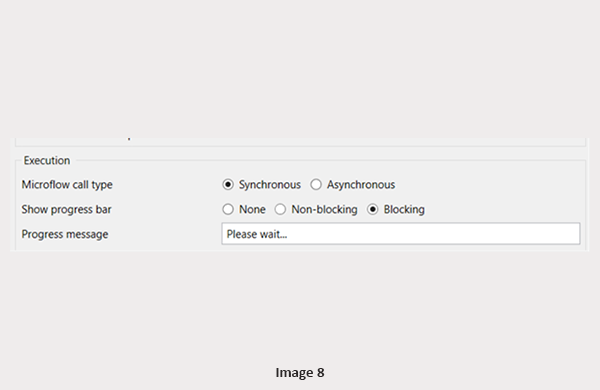
Top tip: Sometimes waiting is unavoidable and processes do take a little bit of time to finish. Making sure the progress bar is enabled and a progress message is visible will keep users in the loop and avoid the re-execution of flows (Image 8).
#3 Page design
When an application feels slow, it’s usually the pages that take the blame as performance issues tend to surface at the page level. Regardless of how efficient the underlying logic is, the users will always notice if a page is trying to load too much data at once. Thoughtful page design helps ensure our applications remain responsive and user-friendly as they grow.
Common mistakes with page design
Retrieving too much data onto the page: Being intentional with what data is loaded can improve page performance instantly. Similar to what we discussed within data retrieval, it is tempting to retrieve the whole data set when the page opens to ensure the user has the data they need. This however often results in slower load times and unnecessary database work.
Using data heavy widgets: Lists and grids are key components of a page, however a few small differences can make a big difference. Showing all columns versus what columns are actually needed or stacking multiple data sources on one page can soon become heavy and sluggish (Image 9).
Best practices to follow with lists and grids:
- Hide columns which aren’t required
- Implement virtual scrolling when dealing with large datasets
- Keep data sources as simple as possible
Triggering long microflows as soon as a page opens: Whilst this can feel like a good way to prepare the page, it often results in slower loading times and frustration for the user. Microflows running automatically when the page loads or calculations firing immediately can make a user feel like the application is struggling before they have even done anything. Although sometimes this is unavoidable, it is worth going back to the flows as the app expands and questioning if they really need to be triggered there.
Improvements:
- Only load the data that is required on the page
- Be mindful of how much data is displayed at once and limit columns to what is needed
- Run logic on a user action instead of a page load if possible
- Split data into tabs to reduce the amount required to load initially
- Limit the use of auto-sizing and dynamic height calculations
Taking the time to review page design, especially as our apps expand can often give quick improvements to the overall user experience.


Mendix Performance Bot
If in doubt when looking for potential improvements and best practices, make use of the Mendix Performance Bot assistant to get guidance and tips. This can be found at the bottom of your Studio Pro screen (Image 10).
The performance bot will highlight many things we have discussed in this blog such as commits inside loops, negating XPath statements and unused attributes. For extra control, Mendix offers the ability to filter the performance tips. This can be done on a module level, in which you can choose which modules are checked, or on a best practice level, where you can select which best practices to limit the search to. This is great if you have noticed a specific section of your app has slowed down and you want to quickly find ways to speed it up.
Conclusions
Keeping Mendix apps fast isn’t about over-optimising every part of the platform. Taking the time to revisit our microflows and pages as our applications evolve will prevent these common mistakes from building up. Being intentional with data retrieval, microflow logic and page design will ensure speedy apps without having to recreate the whole system.
Related Blogs




Drag